All effectsTiger Transition
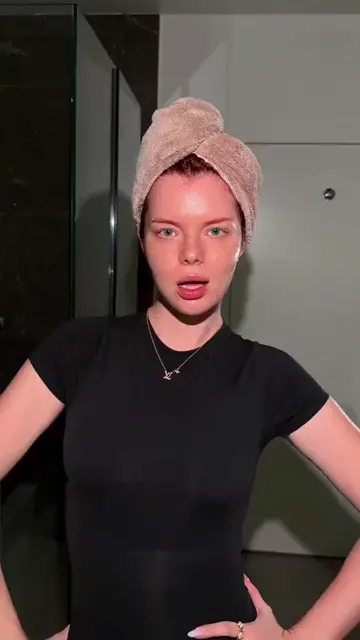
Tiger transition, made with AI: one hand over the lens, a whole new look
The tiger transition is a TikTok glow-up on the spoken line "You cannot reason with a tiger when your head is in its mouth": you mouth it in a plain, just-showered look, cover the lens with your hand, and come back in full glam or full tiger face paint. One photo, of you or your pet, becomes a 9 to 12-second vertical version with the original sound, from 5 credits.
Show your real hair color: the long glam waves after the change take it.
Video settings
First time here? See 2 seconds of your own video free, one per account. The full 9-second video is 5 credits. View pricing
Updated
Your video
Your video shows here when it is ready, and stays in My creations.
- The line
- Hand cover
- Glam reveal
The video
What the tiger transition looks like
A woman stands in front of a grey wall with her hair wrapped in a towel and no makeup, hands on her hips, mouthing a dramatic line with exaggerated snarls and grins. On the last word her hand flies at the lens. When it moves away, she has waist-length glossy red waves and full glam makeup and runs a hand slowly through her hair. In the tiger makeup take, the hand comes back to reveal full orange-and-black tiger face paint and a roar.
The clip playing here is the original TikTok by @anastasile, posted on 11 July 2026, shown with credit. The Tiger makeup version follows @atarahmayhew's post, and Him and Your pet follow @kevinrupard's take from 20 July 2026. None was made on VideoEffect, and no sample made here exists yet.
Second by second
The Glow up version, second by second
Read from @anastasile's clip; the change was measured at 4.6 seconds.
| Time | What is on screen |
|---|---|
| 0:00 to 0:04 | Before: hair in a towel, bare face, black T-shirt, hands on the hips, mouthing the line with fierce faces. |
| 0:04 to 0:04.6 | An open hand moves straight at the lens and covers it. |
| 0:04.6 to 0:09 | After: very long glossy waves in your hair color, full glam makeup, a hand running through the hair, a calm stare. |
Tiger makeup (11 s) changes at 4.6 seconds into full tiger face paint and roars, growls and stares through three quick cuts. Him and Your pet (12 s) change at 4.9 seconds into tiger stripes on a fiery backdrop, with slow head turns and a low growl.
How it works
How to make the tiger transition video
- Choose a version: Glow up, Tiger makeup, Him, or Your pet.
- Upload one photo and pick a resolution. A sharp, front-facing face matters most; for Glow up, a photo that shows your real hair color. Every version is vertical 9:16.
- Press Create and download. The price is on the button; the MP4 comes with the original sound and no watermark.
Posting it. Caption ideas: "before vs after the tiger", "you cannot reason with me either", or "results may vary". Having the sound on the clip does not give you rights to use it everywhere, so check a platform's rules before you put the video in an ad or a paid post, and switch on the AI-generated label when you post.
Versions
Glow up, tiger paint, his take, or your pet
| Version | Before | After | Length |
|---|---|---|---|
| Glow up | Towel turban, bare face, black T-shirt | Long glam waves in your hair color, full makeup | 9 s |
| Tiger makeup | Your own hair, natural face | Full tiger face paint, wild orange hair | 11 s |
| Him | Your own hair, black T-shirt | Tiger face paint and whiskers, striped shoulders | 12 s |
| Your pet | Your pet's own fur | Tiger stripes painted in its fur | 12 s |
The versions name the original takes, not who can use them: anyone can pick any of the people versions.
Price
What the transition costs
Glow up runs 9 seconds, Tiger makeup 11, Him and Your pet 12, all 9:16 with the original sound. The table below lists the credits for each, from 5. The smallest pack is 10 credits for $9.99. Pack credits never expire and a failed render returns its credits. An account that has never bought credits can first make one free 2-second preview at 480p, to watch on the page.
| Length | 480p | 720p | 1080p |
|---|---|---|---|
| Glow up, 9 seconds | 5credits | 8credits | 16credits |
| Tiger makeup, 11 seconds | 6credits | 10credits | 20credits |
| Him, 12 seconds | 6credits | 10credits | 20credits |
| Your pet, 12 seconds | 6credits | 10credits | 20credits |
The trend
Where the tiger transition comes from, and the sound
The line "You cannot reason with a tiger when your head is in its mouth" is usually attributed to Winston Churchill. As a TikTok sound it comes from an animated villain edit that @shogunbiggs posted in May 2026. By early July beauty creators had turned it into a transition, such as @whosbeth_'s, and on 11 July @anastasile went from a towel turban to long red waves in the version most people copy.
Others went further and painted a full tiger face, like @atarahmayhew in August and @thybui.__, and men posted their own takes, such as @kevinrupard's from 20 July. The trend is also called the tiger glow up or the you cannot reason with a tiger trend.
VideoEffect is not affiliated with the creators linked here, TikTok or CapCut.
Photos
A photo for before and after
These points follow from the original clips; the effect has not been test-rendered.
- A sharp face, looking at the camera. All versions are close-ups, and you mouth the line in the first four seconds.
- Your real hair color. In Glow up, the long waves after the change take the color of your photo.
- No sunglasses or heavy filters. The makeup and paint go on top of your own face.
- The looks come from the original takes. The towel, the black top, the glam makeup and the tiger paint are part of the transition; your face and hair color come from your photo.
- For pets, head and chest. The stripes are painted into your pet's own fur.
- Use your own photo, or the photo of someone who agreed to be in the video.
Good to know
What you cannot change
- The spoken line is the original sound; the effect does not record your voice.
- The before and after looks are set per version; you cannot choose another makeup or hair color.
- One person or one pet per video.
- The lengths are fixed per version, from 9 to 12 seconds, always 9:16.
Prompt
Four prompts, four transitions
Below are the prompts for Glow up, Tiger makeup, Him and Your pet. Each follows its original take shot for shot, times the line, the hand over the lens and the reveal, describes the before and after looks, and keeps the face of your photo under the makeup. They are used together with each version's reference clip and its sound.
Glow up
[Video 1] shows the tiger glow-up transition. Follow [Video 1] from the first frame to the last: copy its framing, its timing, the hand that covers the lens to hide the change at the same moment, and every fierce face, grin, head shake and gesture on the same beat. The scene is the one in [Video 1]: a grey wall and a dark doorway behind, a phone standing still at chest height. Do not add any action or scene element that is not in [Video 1].

Use [Audio 1] as the sound of the whole video, unchanged: the same spoken line, nothing added or re-voiced. The mouth moves in time with the spoken line exactly as in [Video 1].

The person in [Image 1] fully replaces the person in [Video 1], before and after the change. Face, eyes, skin tone, build and the natural color of the hair come from [Image 1] and stay recognisably the same in every frame, under the makeup too; nothing of the original creator's face is kept. Ignore the background of [Image 1] and any text in it.

What happens, as in [Video 1]: 0 to 4 s, before: the hair wrapped up in a beige towel turban, a bare face with no makeup, a plain black T-shirt, hands on the hips; the subject mouths the line with big, fierce, playful faces, a snarl, a wide grin, the eyebrows up, small head shakes; 4 to 4.6 s, one arm reaches up and the open hand moves straight at the lens until the palm covers the frame; 4.6 to 9 s, after: the same person, now with very long, glossy, voluminous blow-out waves in the natural hair color of [Image 1], full glam makeup with sculpted brows, lashes, soft contour and glossy lips, and a fitted black top; one hand runs slowly through the hair, then a calm, confident look into the lens. If [Image 1] shows a man, he keeps his own face and body: the towel before, then his own hair styled full and sharp and a groomed look after. The deep red hair color of the original is not used unless [Image 1] shows red hair.

9:16 vertical. Only this one person. No split screen, no captions, text, watermarks or stickers on the picture. The face stays the same as in [Image 1] before and after the change.
Tiger makeup
[Video 1] shows the tiger makeup transition. Follow [Video 1] from the first frame to the last: copy its framing close on the face and shoulders, its timing, the clawed hand at the lens that hides the change, the jump cuts at the same moments, and every scowl, snarl, roar, growl and hand gesture on the same beat. The scene is the one in [Video 1]: a plain light wall before the change and a warm golden-brown backdrop after it, a phone standing still. Do not add any action or scene element that is not in [Video 1].

Use [Audio 1] as the sound of the whole video, unchanged: the same spoken line, nothing added or re-voiced. The mouth moves in time with the spoken line exactly as in [Video 1].

The person in [Image 1] fully replaces the person in [Video 1], before and after the change. Face, eyes, skin tone, build and the natural color of the hair come from [Image 1] and stay recognisably the same in every frame, under the makeup too; nothing of the original creator's face is kept. Ignore the background of [Image 1] and any text in it.

What happens, as in [Video 1]: 0 to 3.5 s, before: the subject as in [Image 1], with their own hair and a natural face, mouthing the line with big, fierce faces, a scowl, a snarl, a wide grin, the eyebrows up; 3.5 to 4.6 s, both hands come up like claws toward the camera and one hand covers the lens; 4.6 to 6 s, after: full tiger face paint, orange with a white muzzle and white around the eyes, bold black tiger stripes over the forehead, cheeks, neck and shoulders, a black nose tip, the hair teased wild and colored bright orange; a roar into the lens with the mouth wide open, a striped clawed hand beside the face; 6 to 7.6 s, a jump cut, a playful growl, a clawed hand at the chin, the tongue out; 7.6 to 8.6 s, a jump cut, a wide toothy roar; 8.6 to 11 s, a jump cut, a slow head tilt and a fierce stare into the lens, the clawed hand moving by the face. Under the paint the face stays the face of [Image 1].

9:16 vertical. Only this one person. No split screen, no captions, text, watermarks or stickers on the picture.
Him
[Video 1] shows the tiger makeup transition. Follow [Video 1] from the first frame to the last: copy its framing close on the head and shoulders, its timing, the open hand at the lens that hides the change at the same moment, and every dramatic face, head turn and stare on the same beat. The scene is the one in [Video 1]: a black backdrop before the change and a fiery orange-brown backdrop after it, a camera standing still. Do not add any action or scene element that is not in [Video 1].

Use [Audio 1] as the sound of the whole video, unchanged: the same spoken line, nothing added or re-voiced. The mouth moves in time with the spoken line exactly as in [Video 1].

The person in [Image 1] fully replaces the person in [Video 1], before and after the change. Face, eyes, skin tone, build and the natural color of the hair come from [Image 1] and stay recognisably the same in every frame, under the makeup too; nothing of the original creator's face is kept. Ignore the background of [Image 1] and any text in it.

What happens, as in [Video 1]: 0 to 4 s, before: the subject as in [Image 1], with their own hair, a natural face and a plain black T-shirt, mouthing the line with big, dramatic faces, the eyes wide, fingertips pressed to the temples, a grin, both hands thrown up beside the head; 4 to 4.9 s, one open hand spreads toward the camera and covers the lens; 4.9 to 12 s, after: full tiger face paint from the forehead to the chest, orange with a white muzzle, white cheeks and brows, bold black stripes, a black nose and thin white whiskers, with black stripes painted over bare shoulders; their own hair as in [Image 1]; slow head turns, a cold stare to the side and back into the lens, then a low growl that shows the teeth. If [Image 1] shows a woman, she keeps her own face, hair and body, in the same face paint, with a black strapless top. No tattoos and no writing on the skin.

9:16 vertical. Only this one person. No split screen, no captions, text, watermarks or stickers on the picture. Under the paint the face stays the face of [Image 1].
Your pet
[Video 1] shows the tiger makeup transition. Follow [Video 1] from the first frame to the last: copy its framing close on the head and chest, its timing and the change hidden behind a cover over the lens at the same moment. The scene is the one in [Video 1]: a black backdrop before the change and a fiery orange-brown backdrop after it, a camera standing still. Do not add any action or scene element that is not in [Video 1].

Use [Audio 1] as the sound of the whole video, unchanged: the same spoken line, nothing added or re-voiced. The animal's mouth opens and closes in time with the line, as if it were saying it.

The animal in [Image 1] fully replaces the man in [Video 1], before and after the change. Its species, breed, face, eyes, ears, fur colors, fur length and markings come from [Image 1] and stay recognisably the same in every frame. It wears no clothes, nothing of the man is kept, and it has animal paws, never human hands. Ignore the background of [Image 1] and any text in it.

What happens, as in [Video 1]: 0 to 4 s, before: the animal with its own natural fur on the black backdrop, staring into the camera with big eyes, tilting its head, its ears moving, its mouth moving with the line; 4 to 4.9 s, it lifts one front paw and swipes it at the lens until the paw pad covers the frame; 4.9 to 12 s, after: the same animal, its own face and eyes, now with bold orange and black tiger stripes painted in its fur, a white muzzle and white around the eyes, on a fiery orange-brown backdrop; slow head turns, a cold stare to the side and back into the lens, then a low growl that shows its teeth.

9:16 vertical. No people, only this one animal. No split screen, no captions, text, watermarks or stickers on the picture. The animal looks the same as in [Image 1] under the stripes.
What is the tiger transition trend?
A TikTok glow-up from summer 2026: you mouth "You cannot reason with a tiger when your head is in its mouth" in a plain look, cover the lens with your hand and reveal a full glam or tiger makeup look.
How do I do the tiger makeup transition with AI?
Choose Tiger makeup, upload one sharp photo of your face, pick a resolution and press Create. You download an 11-second vertical MP4 with the original sound.
Is it free?
Only a 2-second preview is. An account that has never bought credits gets one free 2-second preview at 480p, to watch on the page; the full video costs credits, from 5. Credits return if the render fails.
What does "you cannot reason with a tiger" mean?
That you cannot negotiate with someone who already has you in their power. The line is usually attributed to Winston Churchill.
What is the sound?
The spoken line itself, from an animated edit posted on TikTok in May 2026. The video carries the sound of the take it follows.
Can men do the tiger transition?
Yes. Any version works for anyone; the Him version follows a man's tiger makeup take.
Can my dog or cat do it?
Yes. The Your pet version paints tiger stripes into your pet's own fur. It has not been test-rendered yet.
Is it real makeup?
The original clips are real makeup and hair transformations. Your version is made by AI from your photo.
How long is the video, and what format?
Nine to twelve seconds depending on the version, vertical 9:16, as an MP4 with the original sound and no watermark.
Is the example on this page made with VideoEffect?
No. It is the original TikTok by @anastasile, shown with credit. This effect has not been test-rendered yet.
More effects
More transformation effects
If one transformation was not enough, these effects change things up too.
Tiger Transition
Make yours
The price is on the Create button before anything is charged, and a render that fails gives its credits back.