All effectsReaching Out Cat
Reaching out cat trend, made with AI: no real pet gets picked up
The reaching out cat trend is a two-shot TikTok gag: a phone on the floor films a hand reaching for the ceiling as the sound starts, then it cuts to a calm cat that an arm whisks out of the frame on the next words. One photo puts your cat, your dog or you in that spot, in a 6-second vertical video with the sound, from 4 credits.
You sit on the floor in the cat's spot, so show your whole body if you can.
Video settings
First time here? See 2 seconds of your own video free, one per account. The full 6-second video is 4 credits. View pricing
Updated
Your video
Your video shows here when it is ready, and stays in My creations.
- Reaching out
- Sitting calm
- The grab
- Gone
The video
What the reaching out clip looks like
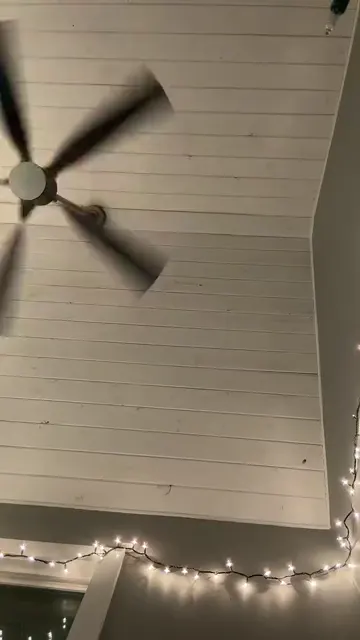
A phone lies on its back on the floor, looking up at a white plank ceiling where a fan is spinning. A hand rises slowly into the picture, fingers stretched toward the ceiling, as the sound begins. Cut: the same phone now looks across the floor at an orange cat sitting calmly by the Christmas tree. On the next words an arm sweeps in and the cat is gone, leaving an empty room.
The clip playing here is "Simba's turn", the original TikTok by @basic_orange_cats, posted on 12 November 2026, shown with credit as the post this effect follows. It was not made on VideoEffect, and no sample made here exists yet.
Second by second
Two shots in six seconds
Read from the original clip; the cut was measured at 2.6 seconds.
| Time | What is on screen |
|---|---|
| 0:00 to 0:02.6 | Shot 1: from the floor, a hand rises slowly toward the ceiling fan. |
| 0:02.6 to 0:03.3 | Cut to shot 2: your pet, or you, sitting calmly on the floor by the tree. |
| 0:03.3 to 0:03.8 | An arm sweeps in and lifts it up out of the frame. |
| 0:03.8 to 0:06 | The empty room with the Christmas tree. |
How it works
How to make the reaching out cat video
- Choose a version: your cat, your dog, or you.
- Upload one photo and pick a resolution. For a pet, a photo that shows the head and body, ideally sitting up. The clip is always 6 seconds in vertical 9:16.
- Press Create and download. The price is on the button; the MP4 comes with the sound on it and no watermark.
Posting it. Owners who post the real version add a reassurance, and it works here too: "no kitties were harmed", or "she's fine, she got treats". Having the sound on the clip does not give you rights to use it everywhere, so check a platform's rules before you put the video in an ad or a paid post, and switch on the AI-generated label when you post.
Versions
Your cat, your dog, or you
Your cat takes one photo of a cat, or any other pet. It sits in Simba's spot by the tree with its own coat and markings.
Your dog takes one photo of a dog. It sits there instead, and stays a dog the whole time.
You takes one photo of a person. You sit on the floor by the tree and get whisked away instead of the cat.
All three follow the same clip, run 6 seconds and cost the same. The hand and the arm stay as in the original.
Price
Six seconds and their price
The video is 6 seconds, 9:16, with sound. The table below lists the credits for each resolution, from 4. The smallest pack is 10 credits for $9.99. Pack credits never expire and a failed render returns its credits. An account that has never bought credits can first make one free 2-second preview at 480p, to watch on the page.
| Length | 480p | 720p | 1080p |
|---|---|---|---|
| 6 seconds | 4credits | 6credits | 12credits |
The trend
Where the reaching out trend comes from, and the song
The sound is a one-line excerpt from Michael Jackson's 1982 song "Human Nature", the line the trend is named after. On TikTok it is an "original sound", first posted on 23 July 2026 by @his_stories_7277 with a hand reaching up and a laugh into the camera. In late October cat owners turned it into the floor-camera gag, such as @kb_rose24's "Touch a stranger" from 4 November.
It broke out on 8 November with @slyerstar_'s grey tabby, followed by @thehurtfam's black cat and "Simba's turn" by @basic_orange_cats, the clip this page follows. The trend is also called the touch a stranger trend or the cat yank trend.
VideoEffect is not affiliated with the Michael Jackson estate, the songwriters, the creators linked here, TikTok or CapCut.
Photos
The photo: sitting calmly, in good light
These points follow from the original clip; the effect has not been test-rendered.
- Head and body in view. Your pet is seen full length from floor level before it disappears.
- Sitting up works best. The cat in the clip sits upright and still.
- Eyes open, sharp, well lit. Fur colors, ears and markings come from the photo.
- For you, whole body or knees up. You sit on the floor in the cat's spot.
- One animal or one person per photo.
- Use a photo of your own pet, or of yourself or someone who agreed to be in it.
Good to know
What the gag cannot change
- The ceiling, the room and the Christmas tree are the original's.
- The hand and the arm are not yours; they stay as in the original.
- One subject per video.
- It is always 6 seconds and 9:16, with the sound.
- No animal is picked up for real: the whole video is made by AI from your photo.
Prompt
The prompts for cat, dog and you
Below are the three prompts. Each keeps the two shots and the cut at 2.6 seconds, describes the ceiling and the room, says what takes the cat's spot, and times the grab. They are used together with the 6-second reference clip and its sound.
You
[Video 1] shows the reaching out cat clip. Follow [Video 1] from the first frame to the last: copy its two shots, the hard cut at the same moment, the camera angle of each shot, and the timing of the rising hand and of the grab on the same beat. Shot 1 is the one in [Video 1]: a phone lying on the floor looks straight up at a white wooden plank ceiling with a spinning ceiling fan and warm string lights along the top of the wall, and a hand rises slowly from the bottom of the frame toward the ceiling. Shot 2 is the one in [Video 1]: a hard cut to the room seen from floor level, a pale glossy floor, a grey wall with a doorway and window blinds, a lit Christmas tree with red ornaments on the left and a garland along the railing at the top right. Do not add any action or scene element that is not in [Video 1].

Use [Audio 1] as the sound of the whole video, unchanged: no new lyrics, no re-singing, no other music or voices. Nobody speaks.

In shot 2, the person in [Image 1] fully replaces the orange cat that sits calmly in the middle of the floor in [Video 1]. The subject sits on the floor in the cat's place, the whole body in view, relaxed, as large in the picture as fits the room. Face, hair, build and clothes all come from [Image 1] and stay the same in every frame of shot 2. Nothing of the cat is kept. Ignore the background of [Image 1] and any text in it. The hand in shot 1 and the arm in shot 2 stay as they are in [Video 1].

What happens, as in [Video 1]: 0 to 2.6 s, shot 1, the hand rises slowly toward the ceiling fan; at 2.6 s, the hard cut; 2.6 to 3.3 s, shot 2, the subject sits calmly on the floor in the cat's spot, looking around; 3.3 to 3.8 s, an arm sweeps in from the side and lifts the subject quickly and gently up out of the frame; 3.8 to 6 s, the empty room with the Christmas tree, as in [Video 1].

9:16 vertical. No split screen, no captions, text, logos, watermarks or stickers on the picture. The face stays the same as in [Image 1].
Your cat
[Video 1] shows the reaching out cat clip. Follow [Video 1] from the first frame to the last: copy its two shots, the hard cut at the same moment, the camera angle of each shot, and the timing of the rising hand and of the grab on the same beat. Shot 1 is the one in [Video 1]: a phone lying on the floor looks straight up at a white wooden plank ceiling with a spinning ceiling fan and warm string lights along the top of the wall, and a hand rises slowly from the bottom of the frame toward the ceiling. Shot 2 is the one in [Video 1]: a hard cut to the room seen from floor level, a pale glossy floor, a grey wall with a doorway and window blinds, a lit Christmas tree with red ornaments on the left and a garland along the railing at the top right. Do not add any action or scene element that is not in [Video 1].

Use [Audio 1] as the sound of the whole video, unchanged: no new lyrics, no re-singing, no other music or voices. Nobody speaks.

In shot 2, the animal in [Image 1] fully replaces the orange cat that sits calmly in the middle of the floor in [Video 1]. It sits upright in the cat's spot in the same pose and at its own natural size. Its species, breed, face, eyes, ears, fur colors, fur length and markings all come from [Image 1] and stay the same in every frame of shot 2. The orange coat of the original cat is not kept unless [Image 1] shows it. It has animal paws, never human hands. Ignore the background of [Image 1] and any text in it. The hand in shot 1 and the arm in shot 2 stay as they are in [Video 1].

What happens, as in [Video 1]: 0 to 2.6 s, shot 1, the hand rises slowly toward the ceiling fan; at 2.6 s, the hard cut; 2.6 to 3.3 s, shot 2, the animal sits calmly on the floor in the cat's spot, looking around; 3.3 to 3.8 s, an arm sweeps in from the side and lifts it quickly and gently up out of the frame; 3.8 to 6 s, the empty room with the Christmas tree, as in [Video 1].

9:16 vertical. No split screen, no captions, text, logos, watermarks or stickers on the picture. The animal looks the same as in [Image 1].
Your dog
[Video 1] shows the reaching out cat clip. Follow [Video 1] from the first frame to the last: copy its two shots, the hard cut at the same moment, the camera angle of each shot, and the timing of the rising hand and of the grab on the same beat. Shot 1 is the one in [Video 1]: a phone lying on the floor looks straight up at a white wooden plank ceiling with a spinning ceiling fan and warm string lights along the top of the wall, and a hand rises slowly from the bottom of the frame toward the ceiling. Shot 2 is the one in [Video 1]: a hard cut to the room seen from floor level, a pale glossy floor, a grey wall with a doorway and window blinds, a lit Christmas tree with red ornaments on the left and a garland along the railing at the top right. Do not add any action or scene element that is not in [Video 1].

Use [Audio 1] as the sound of the whole video, unchanged: no new lyrics, no re-singing, no other music or voices. Nobody speaks.

In shot 2, the dog in [Image 1] fully replaces the orange cat that sits calmly in the middle of the floor in [Video 1]. It sits in the cat's spot in the same calm pose and at its own natural size. Its breed, face, eyes, ears, fur colors, fur length and markings all come from [Image 1] and stay the same in every frame of shot 2; it is a dog the whole time, never a cat. Nothing of the orange cat is kept. It has dog paws, never human hands. Ignore the background of [Image 1] and any text in it. The hand in shot 1 and the arm in shot 2 stay as they are in [Video 1].

What happens, as in [Video 1]: 0 to 2.6 s, shot 1, the hand rises slowly toward the ceiling fan; at 2.6 s, the hard cut; 2.6 to 3.3 s, shot 2, the dog sits calmly on the floor in the cat's spot, looking around; 3.3 to 3.8 s, an arm sweeps in from the side and lifts it quickly and gently up out of the frame; 3.8 to 6 s, the empty room with the Christmas tree, as in [Video 1].

9:16 vertical. No split screen, no captions, text, logos, watermarks or stickers on the picture. The dog looks the same as in [Image 1].
What is the reaching out cat trend?
A TikTok gag from November 2026: a hand reaches for the ceiling as the sound starts, then the clip cuts to a calm cat that an arm whisks out of the frame a moment later.
How do I make the reaching out cat AI video?
Choose Your cat, upload one photo, pick a resolution and press Create. You download a 6-second vertical MP4 with the sound.
Is it free?
Only a 2-second preview is. An account that has never bought credits gets one free 2-second preview at 480p, to watch on the page; the full video costs credits, from 4. Credits return if the render fails.
What song is it?
A one-line excerpt from Michael Jackson's "Human Nature" (1982), the line the trend is named after, posted on TikTok as an original sound.
Can I make it without picking up my cat?
Yes. That is the point of this page: the video is made from a photo, so your cat stays where it is.
Does it work with a dog?
Yes. The Your dog version puts your dog in the cat's spot. It has not been test-rendered yet.
Is the cat in the original hurt?
Owners who post it say their cats are fine, and many say they sped the clip up. In your version no animal is involved at all.
Can I put myself in it?
Yes. The You version sits you on the floor by the tree and whisks you away instead.
How long is the video, and what format?
Six seconds, vertical 9:16, as an MP4 with the sound on it and no watermark.
Is the example on this page made with VideoEffect?
No. It is "Simba's turn" by @basic_orange_cats, shown with credit. This effect has not been test-rendered yet.
More effects
More effects for your pet
If your pet's disappearing act went down well, these effects have more roles for it.

Reaching Out Cat
Make yours
The price is on the Create button before anything is charged, and a render that fails gives its credits back.