All effectsCat Taxi
Cat Taxi AI: hail a ride, get a giant pet
Cat taxi AI turns a photo of you and a photo of your cat or dog into the 12-second giant cat taxi clip: you raise a hand at the curb at night, your pet runs up as big as a bus, lies down and carries you off on its back. Vertical 9:16, original sound, from 6 credits.
Your pet is the star: use a sharp whole-body photo of it as photo 2.
Video settings
This video: 6 credits. Ready in about 5 to 15 minutes; failed generations return your credits. View pricing
Updated
Your video
Your video shows here when it is ready, and stays in My creations.
- Hail
- Arrives
- Cheek rub
- Climb on
- Ride off
The video
What the video looks like
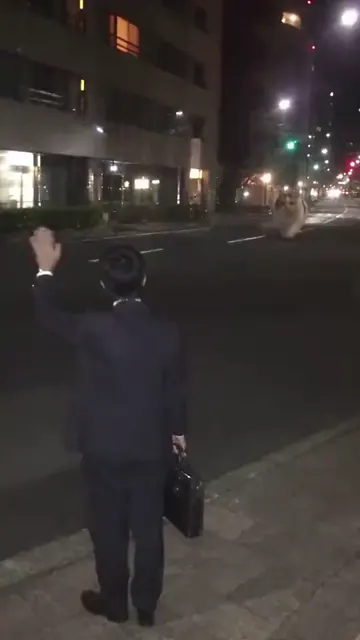
A city street after dark, office lobbies still lit, the road empty. Someone in work clothes with a briefcase stands at the curb, back to the phone, and raises a hand. Far down the road something is running toward them, and it is not a car. A cat the size of a bus pulls up, flops down along the curb and leans its head in to be stroked. The commuter climbs onto its back, and the cat trots off between the street lights.
The clip shown here is a TikTok posted by @kittymeow348 on 10 November 2026 with the caption "Cat taxi". It is an AI-made scene, shown with credit as the post this effect follows. It was not made on VideoEffect, and no sample made here exists yet.
Second by second
The ride, second by second
Read from the original clip, one frame per second.
| Time | What is on screen |
|---|---|
| 0:00 to 0:02 | You stand at the curb with your back to the camera and raise a hand. A shape runs up the empty road. |
| 0:02 to 0:04 | The giant animal arrives, towers over you and lies down along the curb. |
| 0:04 to 0:06 | You stroke its cheek. It closes its eyes. |
| 0:06 to 0:09 | You climb up its side and settle on its back, briefcase in hand. |
| 0:09 to 0:12 | It stands and trots away down the road with you on top, shrinking into the distance. |
How it works
How to make a cat taxi AI video
- Choose a version: you and your pet, or your pet only.
- Upload the photos. For two photos, your own photo goes first and your pet's second.
- Pick a resolution, press Create and download. The price is on the button; the MP4 has the street sound on it and no watermark.
Posting it. The clip spread with the plain caption "Cat taxi", and remakes are tagged #cattaxi. With your own pet, the caption writes itself: "my ride is here", "five stars, sheds a little". The cat taxi video comes with the street sound of the original on it. Having the sound on the clip does not give you rights to use it everywhere, so check a platform's rules before you put the video in an ad or a paid post, and switch on the AI-generated label when you post.
Versions
You and your pet, or your pet only
You + your pet takes two photos. Photo 1 replaces the commuter at the curb, in your own clothes. Photo 2 replaces the giant cat with your cat or dog, scaled up to bus size with its own coat and markings.
Your pet only takes one photo. Your pet becomes the giant taxi, and the commuter in the black suit stays as in the original clip.
The commuter is seen from behind and from a distance for most of the clip, so the pet is the part people will recognize. Both versions cost the same.
Price
The fare, in credits
Cat taxi AI makes a 12-second vertical video with sound. The table below lists the credits for each resolution, from 6. The smallest pack is 10 credits for $9.99. Pack credits never expire and a failed render returns its credits. This effect has no free preview.
| Length | 480p | 720p | 1080p |
|---|---|---|---|
| 12 seconds | 6credits | 10credits | 20credits |
The trend
Where the cat taxi comes from
The cat taxi is one AI-made clip that spread through reposts. The copy this page follows was posted on TikTok by @kittymeow348 on 10 November 2026, and others are collected under #cattaxi. We could not confirm who made the clip first, so the credit here goes to the post we follow.
It belongs to a wider run of giant-cat videos, such as @thegiantcatworld's from October 2026. People also call this one the pet taxi, the giant cat taxi or the giant kitty ride.
VideoEffect is not affiliated with the creators linked here, TikTok or CapCut.
Photos
One photo of you, one of your pet
These points follow from the original clip; the effect has not been test-rendered.
- Your pet: whole body, side or front view, good light. It fills half the frame when it lies down, so its coat and markings matter most.
- You: head to toe, one person. You are shown full length, mainly from behind, so your outfit and hair are what carry over.
- One animal per photo.
- A cat or a dog. The scene is built around a four-legged animal that can lie down and be ridden.
- Use your own photo and a photo of your own pet, or of people and pets whose owners agreed.
Good to know
What it cannot do
- It cannot show your face in close-up. The commuter faces away from the camera, as in the original.
- It cannot change the street, the time of day or the route.
- One person and one animal at most.
- It cannot use your own sound.
- It is fixed at 12 seconds and 9:16.
Prompt
The prompt behind the ride
Below are the two prompts. The two-photo prompt replaces both the commuter and the giant cat; the one-photo prompt replaces only the cat and says that the commuter stays. Both give the animal's size relative to the person and list the five beats of the ride. They are used together with the 12-second reference clip and its sound.
You + your pet
[Video 1] shows the cat taxi clip. Follow [Video 1] from the first frame to the last: copy its framing, the handheld phone camera and its small pan to the right at the end, its pace and every movement of the person and of the giant animal. It is one continuous take with no cuts. The scene is the one in [Video 1]: a quiet city street at night between office buildings with lit lobbies, street lights, a wide grey paved sidewalk and an empty road. Do not add any action or scene element that is not in [Video 1].

Use [Audio 1] as the sound of the whole video, unchanged: no other music, voices or speech.

The person in [Image 1] fully replaces the man in the black suit who stands at the curb in [Video 1]. The subject is in his place in every frame, as close to the camera and as large in the picture, seen mostly from behind as he is. Face, hair, build and clothes all come from [Image 1] and stay the same from the first frame to the last; his black suit and short black hair are his only and are not drawn on the subject. Trousers or shoes that the photo does not show are drawn as plain ones that match the top. The briefcase in his hand stays as a prop.

The animal in [Image 2] fully replaces the giant calico cat in [Video 1], the whole body and not only the head. It is as large as that cat, about the size of a bus next to the person, in the same place and the same pose in every frame. Its species, breed, face, eyes, ears, fur colors, fur length and markings all come from [Image 2]; the white, orange and black coat of the cat in [Video 1] is not kept. It wears nothing unless [Image 2] shows it. Ignore the backgrounds of both photos and any text in them.

What happens, as in [Video 1]:
0 to 2 s: the person stands at the curb with their back to the camera and raises one hand as if hailing a taxi; far down the empty road the giant animal comes running.
2 to 4 s: it arrives, towering over the person, and lies down along the curb with its head beside them.
4 to 6 s: the person strokes its cheek; it closes its eyes.
6 to 9 s: the person climbs up its side and sits astride its back, holding the briefcase.
9 to 12 s: the animal stands and trots away down the road with the person on its back, getting smaller between the street lights as the camera pans after it.

Nobody speaks.

9:16 vertical. No split screen, only this one person and this one animal, no captions, text, logos, watermarks or stickers on the picture. The person and the animal look the same as in their photos from start to finish.
Your pet only
[Video 1] shows the cat taxi clip. Follow [Video 1] from the first frame to the last: copy its framing, the handheld phone camera and its small pan to the right at the end, its pace and every movement of the man and of the giant animal. It is one continuous take with no cuts. The scene is the one in [Video 1]: a quiet city street at night between office buildings with lit lobbies, street lights, a wide grey paved sidewalk and an empty road. Do not add any action or scene element that is not in [Video 1].

Use [Audio 1] as the sound of the whole video, unchanged: no other music, voices or speech.

The only change: the animal in [Image 1] fully replaces the giant calico cat in [Video 1], the whole body and not only the head. It is as large as that cat, about the size of a bus next to the man, in the same place and the same pose in every frame. Its species, breed, face, eyes, ears, fur colors, fur length and markings all come from [Image 1]; the white, orange and black coat of the cat in [Video 1] is not kept. It wears nothing unless [Image 1] shows it. The man in the black suit with the briefcase stays exactly as in [Video 1]. Ignore the background of [Image 1] and any text in it.

What happens, as in [Video 1]:
0 to 2 s: the man stands at the curb with his back to the camera and raises one hand as if hailing a taxi; far down the empty road the giant animal comes running.
2 to 4 s: it arrives, towering over him, and lies down along the curb with its head beside him.
4 to 6 s: he strokes its cheek; it closes its eyes.
6 to 9 s: he climbs up its side and sits astride its back, holding the briefcase.
9 to 12 s: the animal stands and trots away down the road with him on its back, getting smaller between the street lights as the camera pans after it.

Nobody speaks.

9:16 vertical. No split screen, no extra people or animals, no captions, text, logos, watermarks or stickers on the picture. The animal looks the same as in [Image 1] from start to finish.
What is the cat taxi AI trend?
It is an AI-made clip in which a commuter hails a taxi at night and a giant cat arrives instead, lies down and carries them home. People now make it with their own pets.
How do I make a cat taxi AI video?
Choose a version on this page, upload your photo and your pet's photo, pick a resolution and press Create. A 12-second vertical MP4 comes back.
Is the cat taxi real?
No. It is AI-made. There is no bus-sized taxi cat.
Is it free?
No. It costs credits, from 6, with no free preview. Credits return if the render fails.
Can I use my dog?
Yes. The prompt takes the species and breed from the photo, so a dog becomes a giant dog taxi. It has not been test-rendered yet.
Do I have to be in the video?
No. The pet-only version needs just one photo of your pet.
Will people recognize me?
Mostly by your clothes and hair. The commuter is filmed from behind and at a distance, as in the original.
Is there a CapCut template for it?
This page does not use one. It follows the original clip directly from your photos.
What sound is on the video?
The audio of the TikTok this effect follows, unchanged.
What do I get when the video is done?
Twelve seconds, vertical 9:16, as an MP4 with the original sound and no watermark. The cat taxi video is one take, from the raised hand to the ride away.
Does the original clip show up in my video?
In the You + pet version both the commuter and the giant cat are replaced. In the pet-only version the commuter of the original stays and only the cat becomes your pet.
Will I wear my own clothes in the video?
Yes. In the You + pet version you stand at the curb in the clothes of your photo. The briefcase stays in your hand as a prop of the scene.
More effects
Other pet effects to try
Once your pet has been a taxi, try it in these other roles.

Cat Taxi
Make yours
The price is on the Create button before anything is charged, and a render that fails gives its credits back.