All effectsKing Jin
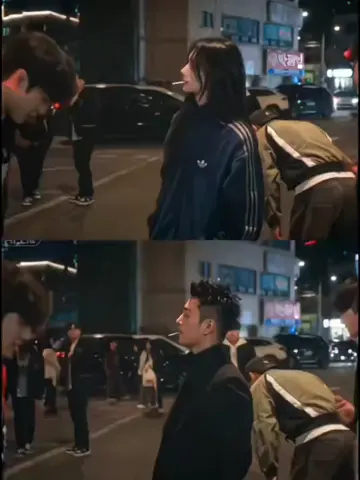
King Jin AI trend: the boss of a neon street, from one photo
The King Jin AI trend turns one photo into a moody Korean-drama-style scene: you stand still on a neon street at night while a crowd in dark jackets bows deeply, and the camera pushes in on your calm stare. One photo of you or your pet becomes an 8-second vertical video with the trend's song, from 4 credits.
A clear, front-facing face: the scene ends on a close-up of it.
Video settings
First time here? See 2 seconds of your own video free, one per account. The full 8-second video is 4 credits. View pricing
Updated
Your video
Your video shows here when it is ready, and stays in My creations.
- The bow
- Push in
- Close-up
- The stare
The video
What the boss scene looks like
A narrow street at night, neon signs glowing over parked cars. One person stands in the middle, perfectly still, staring into the camera, while everyone around them, rows of young people in dark jackets, bends into a deep bow. The camera moves in, a lollipop comes out of the mouth, a small cool smile, and the stare holds. In the template it then cuts to a teal stairwell and a rooftop above the city.
The clip playing here is the template result shown in @xdwshfzqi0k's tutorial from 13 November 2026, a woman and a man stacked on one screen, credited to that post. It comes from an app template, and its scenes may be taken from a TV drama, so this effect does not copy it: it films a new single-take street scene from your photo. It was not made on VideoEffect, and no sample made here exists yet.
Second by second
The eight seconds this effect films
This is the scene the prompt writes, in one continuous take; it is not read from a clip.
| Time | What is on screen |
|---|---|
| 0:00 to 0:02.5 | You stand still in the middle of the street; the crowd bows in a wave. |
| 0:02.5 to 0:05 | The camera pushes in slowly; you do not move. |
| 0:05 to 0:06.5 | Close on your face: a lollipop comes out, a small cool smile. |
| 0:06.5 to 0:08 | A calm stare into the lens; the crowd stays bowed. |
How it works
How to make the King Jin AI video
- Choose a version: you, or your pet.
- Upload one photo with your face clear and pick a resolution. The clip is always 8 seconds in vertical 9:16.
- Press Create and download. The price is on the button; the MP4 comes with the trend's song and no watermark.
Posting it. Caption ideas: "when I walk into the group chat", "respect the boss", or "King Jin era". Having the sound on the clip does not give you rights to use it everywhere, so check a platform's rules before you put the video in an ad or a paid post, and switch on the AI-generated label when you post.
Versions
You, or your pet as the boss
You takes one photo of a person. You stand in the middle of the street in the clothes of your photo, and the scene ends on a close-up with a lollipop and a half-smile.
Your pet takes one photo of an animal. It sits calmly in the middle of the street while the crowd bows, then blinks slowly into the lens.
Both run 8 seconds and cost the same. There is no original clip to follow: the scene is written in words, and the song is added afterwards.
Price
What eight seconds of respect cost
The video is 8 seconds, 9:16, with the trend's song. The table below lists the credits for each resolution, from 4. The smallest pack is 10 credits for $9.99. Pack credits never expire and a failed render returns its credits. An account that has never bought credits can first make one free 2-second preview at 480p, to watch on the page.
| Length | 480p | 720p | 1080p |
|---|---|---|---|
| 8 seconds | 4credits | 6credits | 12credits |
The trend
Where the King Jin trend comes from
King Jin started as a CapCut photo template in mid-November 2026, called the King Jin powerful incoming or powerful entrance effect: upload one photo and become the boss of a Korean night street. The hashtag #kingjinaitrend appeared on 11 November, @tramthoigian_01 posted an early result on 13 November, and @xdwshfzqi0k's tutorial the same day spread it widely, with many early posts from Myanmar, Vietnam and Indonesia.
Comments under the tutorial say the template's scenes come from the Korean drama Weak Hero Class 2. That has not been confirmed, which is why this effect writes its own street scene instead of copying the template.
VideoEffect is not affiliated with the creators linked here, any TV production, TikTok or CapCut.
Photos
The photo: face clear, standing tall
This effect has not been test-rendered.
- A clear, front-facing face. The scene ends on a close-up of your face.
- Upper body at least. You are seen from mid-distance first, then close.
- Clothes come from your photo. Dark, simple clothes suit the mood, but anything works.
- One person or one animal per photo.
- For pets, a clear face. Your pet sits still and stares into the lens.
- Use your own photo, or the photo of someone who agreed to be in the video.
Good to know
What this version does not do
- It does not copy the template's stairwell and rooftop shots; it is one street scene in a single take.
- The crowd never shows their faces; only you stand upright.
- One person or one pet per video.
- It is always 8 seconds and 9:16, with the trend's song.
Prompt
The two prompts that write the scene
Below are the prompts for you and for your pet. Each describes the street, the bowing crowd and the push-in second by second, and keeps the face of your photo the same throughout. There is no reference clip: the scene is generated from the words and your photo, and the song is laid over it afterwards.
You
A real live-action phone-camera video, vertical 9:16, one continuous take of 8 seconds with no cuts, at night on a narrow Korean city street: neon shop signs in Korean script, glowing windows, parked cars along both sides, wet asphalt reflecting the lights. Moody, cinematic, slightly cool colors.

The person in [Image 1] stands still in the middle of the street, facing the camera, calm and composed, like the untouchable boss of the neighborhood. Face, hair, build and clothes come only from [Image 1] and stay exactly the same from the first frame to the last. Ignore the background of [Image 1] and any text in it.

Around them, on both sides of the street, a crowd of young people in dark jackets and tracksuits bow deeply toward the subject, heads low, so that no other face is seen clearly. Only the subject stands upright and faces the camera.

What happens: 0 to 2.5 s, a medium-wide view: the subject stands still while the whole crowd bends into a deep bow in a wave from front to back; 2.5 to 5 s, the camera pushes in slowly toward the subject, who does not move, eyes on the lens; 5 to 6.5 s, close on the face and shoulders: the subject takes a lollipop from their mouth and gives a small, cool half-smile; 6.5 to 8 s, a calm, steady stare straight into the lens while the bowed crowd stays low behind.

The video is filmed without speech; the trend's song is laid over the finished video afterwards. Only one person standing upright. No split screen, no captions, text, logos, watermarks or stickers; the shop signs are blurred enough that no words can be read.
Your pet
A real live-action phone-camera video, vertical 9:16, one continuous take of 8 seconds with no cuts, at night on a narrow Korean city street: neon shop signs, glowing windows, parked cars along both sides, wet asphalt reflecting the lights. Moody, cinematic, slightly cool colors.

The animal in [Image 1] sits calmly in the middle of the street, facing the camera, like the untouchable boss of the neighborhood. Its species, breed, face, eyes, ears, fur colors, fur length and markings come only from [Image 1] and stay exactly the same from the first frame to the last, with the natural body and proportions of that animal. It wears no clothes. Ignore the background of [Image 1] and any text in it.

Around it, on both sides of the street, a crowd of young people in dark jackets and tracksuits bow deeply toward the animal, heads low, so that no face is seen clearly.

What happens: 0 to 2.5 s, a medium-wide view: the animal sits still while the whole crowd bends into a deep bow in a wave from front to back; 2.5 to 5 s, the camera pushes in slowly toward the animal, which does not move, eyes on the lens; 5 to 6.5 s, close on its face: a slow blink and a small tilt of the head; 6.5 to 8 s, a calm, steady stare straight into the lens while the bowed crowd stays low behind.

The video is filmed without speech; the trend's song is laid over the finished video afterwards. Exactly one animal, no people standing upright. No split screen, no captions, text, logos, watermarks or stickers; the shop signs are blurred enough that no words can be read.
What is the King Jin AI trend?
A November 2026 trend from a CapCut photo template: one photo becomes a Korean-drama-style scene in which you stand still on a neon street while a crowd bows to you.
How do I make the King Jin AI video with my photo?
Choose You, upload one photo with your face clear, pick a resolution and press Create. You download an 8-second vertical MP4 with the trend's song.
Is it free?
Only a 2-second preview is. An account that has never bought credits gets one free 2-second preview at 480p, to watch on the page; the full video costs credits, from 4. Credits return if the render fails.
Do I need the CapCut template?
No. This page makes its own version of the scene from your photo; no app is needed.
Can my dog or cat be King Jin?
Yes. The Your pet version puts your animal in the middle of the bowing street. It has not been test-rendered yet.
Is it the same as the CapCut template video?
No. The template has four shots and may use scenes from a drama; this effect films one new street scene in a single take.
What song is used?
The sound of the trend's template posts, laid over your video after it is made.
How long is the video, and what format?
Eight seconds, vertical 9:16, as an MP4 with the song on it and no watermark.
Is the video real?
No. Everything in it, the street and the crowd included, is made by AI from your photo.
Is the example on this page made with VideoEffect?
No. It is the template result from @xdwshfzqi0k's tutorial, shown with credit. This effect has not been test-rendered yet.
More effects
More scenes to star in
If being bowed to suited you, these effects give you other scenes to own.
King Jin
Make yours
The price is on the Create button before anything is charged, and a render that fails gives its credits back.