All effectsFlamingo Float
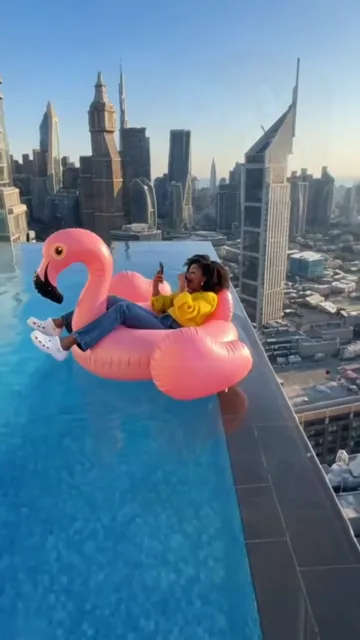
Flamingo Float AI: you, a pink flamingo and a rooftop pool
Flamingo float AI turns one photo into a 6-second video of you lying on a pink flamingo pool float, pushing off and gliding to the far edge of a rooftop infinity pool above a city skyline. Vertical 9:16, with the template's sound, from 4 credits.
A clear face matters most: you are close only for the first three seconds.
Video settings
This video: 4 credits. Ready in about 5 to 15 minutes; failed generations return your credits. View pricing
Updated
Your video
Your video shows here when it is ready, and stays in My creations.
- Lounging
- The warning
- Push off
- Drift away
The video
What the video looks like
A long, bright blue infinity pool on top of a skyscraper, with towers and open sky beyond its far edge. In the near corner, someone lies back on a huge pink inflatable flamingo, completely at ease. A man's hand reaches into the frame from below as if to warn them. They look at it, push off from the pool wall anyway, and the flamingo carries them the whole length of the pool, getting smaller, until it stops at the edge with nothing behind it.
The person on the float is you. The pool, the hand and the glide come from a CapCut template result posted by @nihao9581 on TikTok on 4 November 2026. That post is the reference clip and was not made on VideoEffect.
Second by second
Six seconds on the float
Read from the reference clip, one frame per second.
| Time | What is on screen |
|---|---|
| 0:00 to 0:02 | You lie on the pink flamingo at the near side of the pool, relaxed in the sun, skyline behind. |
| 0:02 to 0:03 | A man's hand comes in from the bottom left and waves at you. You turn your head toward it. |
| 0:03 to 0:04 | You reach to the pool wall and shove off. The float starts to move. |
| 0:04 to 0:05 | The flamingo glides away down the pool, shrinking in the frame. |
| 0:05 to 0:06 | It reaches the far infinity edge and stops there, with you still on it. |
How it works
How to make a flamingo float AI video
- Upload one photo of yourself.
- Choose a resolution. The clip is always 6 seconds, vertical 9:16.
- Press Create, then download. The price is on the button, and the MP4 comes with sound and no watermark.
Price
How much it costs
Flamingo float AI makes a 6-second 9:16 video with sound for 4 credits at 480p, 6 at 720p or 12 at 1080p. The smallest pack is 10 credits for $9.99. Pack credits never expire, failed renders return their credits, and there is no free preview for this effect.
| Length | 480p | 720p | 1080p |
|---|---|---|---|
| 6 seconds | 4credits | 6credits | 12credits |
The trend
Where the flamingo float trend comes from
The clip is a CapCut template trend from the first days of November 2026. TikTok tutorials describe it with captions like "AI effect person on flamingo floatie", and some sites list it as the "Hey Bro Thank You Bro" trend. Others simply call it the flamingo pool trend or the rooftop pool AI trend.
The sound on your video is the template's own audio from the reference post.
VideoEffect is not affiliated with the template's makers, the creator linked here, TikTok or CapCut.
Photos
Choosing a photo for the pool
- A clear face, one person. You are close to the camera for the first three seconds and far away for the last two, so the opening carries the likeness.
- Clothes come from the photo. You will float in whatever you are wearing in it; the white top and swimwear of the reference are not copied. For a pool look, use a photo in summer clothes.
- Hair too. The model keeps your hairstyle from the photo.
- Use your own photo, or one of someone who agreed to be in the video.
The effect was test-rendered once on the same video model on 5 November 2026, from a photo of an AI-made woman at 480p. She was on the float from the first frame and kept her face, curly hair and yellow top throughout; the hand came in, she pushed off and reached the far edge on the template's timing.
Good to know
What you cannot change about the float ride
- It cannot swap the flamingo for another float or the rooftop for another pool.
- It cannot fit two people on the float. One photo, one person.
- It cannot change the ending: the float always stops at the far edge.
- It is fixed at 6 seconds and 9:16.
- A pet can be the subject in principle, because the prompt tells the model to lay an animal on the float in the same spot, but that has not been test-rendered.
Prompt
The prompt, in English
Below is an English version of the instructions this effect uses with your photo. They describe the fixed phone camera and the rooftop pool, keep the stranger's hand as it is, put the person in the photo on the float, and give the path of the float second by second. It is a translation, and the instructions are meant to be used with the 6-second reference clip and its sound.
Flamingo float AI prompt
Follow [Video 1] throughout: copy its framing and camera (a phone held upright, standing at the corner of the pool nearest the camera, the camera almost still, looking down the length of the pool), its rhythm, and every move, head turn and expression of the subject, as well as the path of the float. The scene is the same as in [Video 1]: daytime, an infinity pool on top of a skyscraper, bright blue water, a wide spread of tall buildings and blue sky beyond the pool; the subject lies on a very large pink inflatable flamingo float. The man's hand that reaches in from the bottom left of the frame at about 1.5 to 3 seconds is the same as in [Video 1]: just the hand of an ordinary stranger off camera. Do not add any action or scene element that is not in [Video 1].

Use [Audio 1] as the sound of the whole video, kept exactly as it is: do not add other music, voices or speech.

[Image 1] is the subject's full-body portrait and [Image 2] is the subject's own original photo. There is only one subject: the person in [Image 1]. [Image 2] is used only to see the face clearly: if there are other people in [Image 2], look only at the face of the same person as in [Image 1]; the other people, poses and actions in [Image 2] must not appear in the video. The subject fully replaces the young woman in [Video 1] with long black hair, in a white top, lying on the pink flamingo float. In every frame the subject is in the young woman's place: lying in the same spot on the float, as close to the camera as she is, as large in the picture, with the same direction of body and head. Weight and build follow the subject's own (as in [Image 1]). The face follows [Image 2]: the face shape, the features and the size and shape of the eyes are the same as in [Image 2], and do not turn into the face of the young woman in [Video 1]; the age looks the same as in [Image 2], and so do the skin texture, the shape of the eyebrows and the lip color; a male subject keeps his own masculine facial lines and a female subject her own feminine facial lines; the expressions are the same as in [Video 1], but no more exaggerated than in [Video 1]. Hairstyle and hair color, build and clothes follow [Image 1]. Whatever is on the face and body is drawn only from [Image 1] and [Image 2]: what is there in [Image 1] and [Image 2] keeps the same look and position and is there from start to finish; what is not there in [Image 1] and [Image 2] is never added. The young woman's white top, her swimwear and her hairstyle: none of them is drawn on the subject. If the subject is an animal, it lies on its front in the same spot on the float and pushes off the pool edge with its front paws; none of the young woman's clothes or accessories stay in the picture. Ignore the backgrounds of [Image 1] and [Image 2], and leave out any text or captions in [Image 2].

Every move and position of the subject and of the float is the same as in [Video 1] at the same moment, on the same side (left and right are as seen in the picture).
0 to 1.5 s: the subject lies on the pink flamingo float, which rests against the side of the pool nearest the camera; the subject leans back, relaxed, enjoying the sun.
1.5 to 3 s: a man's hand reaches in from the bottom left of the frame and waves at the subject as a warning; the subject turns the head toward the hand.
3 to 3.5 s: the subject reaches out and pushes hard against the pool edge, and the float starts to leave the edge.
3.5 to 5 s: the float carries the subject slowly across the whole pool toward the far infinity edge, getting smaller and smaller.
5 to 6 s: the float reaches the far edge of the pool and stops at the edge, the subject still on it.

9:16 vertical. No split screen, only the subject in the picture (plus the hand that reaches in), no extra people; no captions, text, watermarks, logos or stickers on the picture. The subject's face stays consistent from start to finish, the same as in [Image 2]; hairstyle and clothes do not change either, the same as in [Image 1].
What is the flamingo float AI trend?
It is a TikTok trend built on a CapCut template: a person lounges on a pink flamingo float in a rooftop infinity pool, ignores a warning hand, pushes off and drifts to the very edge. AI puts your face and outfit on that person.
How do I make a flamingo float AI video?
Upload one photo on this page, pick a resolution and press Create. You download a 6-second vertical MP4 with sound.
Is it free?
No. It costs credits, from 4. There is no free preview, and a failed render gives the credits back.
Why is it called "Hey Bro Thank You Bro"?
It is another name some sites use for the same CapCut template. Both names mean the flamingo float clip.
Is there a flamingo float CapCut template?
Yes, the trend started as one. This page gives the same scene in the browser, without the app.
Whose hand is in the video?
An off-camera stranger's, part of the template scene. It stays in every version and is not replaced.
Will I be in swimwear?
Only if your photo shows you in swimwear. The video uses the clothes from your photo.
Can my dog or cat ride the flamingo?
The prompt includes a line for animals, but only a human photo has been test-rendered.
Can two of us be on the float?
No. The effect is for one person.
More effects
Keep going with six-second effects
Flamingo float AI is one of the shortest effects in the library. These are in the same range.
Flamingo Float
Make yours
The price is on the Create button before anything is charged, and a render that fails gives its credits back.