All effectsCar Drift
Car Drift AI Video: one photo of your car, one sideways slide
A car drift AI video puts your own car into the viral intersection drift reel: it comes across a wet junction at the lights, turns in hard, slides sideways right past the phone and drives off, leaving tire marks. One photo of your car, or you plus your car, or your pet at the wheel. 15 seconds, vertical 9:16, with the reel's sound, from 7 credits.
A daylight photo of the whole car, from a front corner, keeps the paint and shape.
Video settings
First time here? See 2 seconds of your own video free, one per account. The full 15-second video is 7 credits. View pricing
Updated
Your video
Your video shows here when it is ready, and stays in My creations.
- Red light
- Coming in
- The slide
- Drives off
- Tire marks
The video
What the drift clip looks like
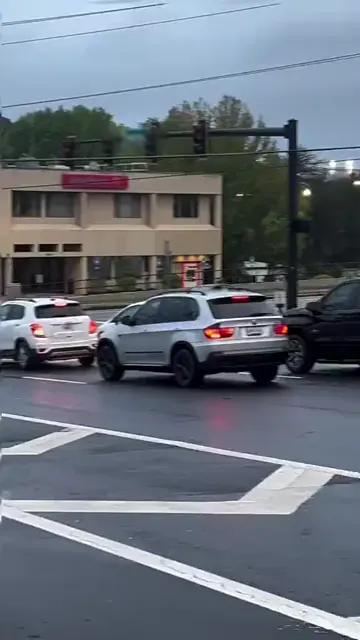
Someone stands at the edge of a wide, rain-soaked junction on a grey day and films with a phone. Two SUVs wait at the stop line, the lights hang red over the road, and a dark sedan rolls past close by. Then a black sports sedan appears far across the intersection with its headlights on, turns in hard and slides sideways right past the lens, so close that its side fills the frame. It straightens, drives away, and the phone lingers on the fresh curved tire marks on the wet asphalt.
The clip playing here is the original Instagram reel by @offguardm, posted on 31 October 2026, shown with credit as the reel this effect follows. It is real phone footage. It was not made on VideoEffect, and no sample made here exists yet.
Second by second
Fifteen seconds at the lights
Read from the original reel, one frame per second.
| Time | What is on screen |
|---|---|
| 0:00 to 0:02 | The phone pans across the wet intersection; a white SUV and a silver SUV wait at the stop line. |
| 0:02 to 0:03 | It tilts up to the red traffic lights as a dark sedan rolls past close on the left. |
| 0:03 to 0:05 | Far across the junction, the hero car comes toward the camera with its headlights on. |
| 0:05 to 0:07 | It turns in hard, the rear swings out and it slides sideways right past the lens. |
| 0:07 to 0:10 | It straightens and drives away down the road. |
| 0:10 to 0:15 | The camera stays on the curved tire marks while traffic moves far away. |
How it works
How to make a car drift AI video
- Choose a version: your car on its own, you plus your car, or your pet at the wheel.
- Upload the photo or photos and pick a resolution. For the car, use a photo that shows the whole vehicle. The clip is always 15 seconds in vertical 9:16.
- Press Create and download. The price is on the button; the MP4 comes with the reel's sound on it and no watermark.
Posting it. The video is ready for Reels or TikTok as it is. Caption ideas: the car's name and nothing else, "no tires were harmed", or "she slides". Having the sound on the clip does not give you rights to use it everywhere, so check a platform's rules before you put the video in an ad or a paid post, and switch on the AI-generated label when you post.
Versions
Your car, you and your car, or your pet driving
Your car takes one photo of the vehicle. It replaces the black sedan for the whole clip, and the windows stay dark, as in the reel, so nobody is seen at the wheel.
You + your car takes two photos: photo 1 is you, photo 2 is the vehicle. Your car does the slide, and through the open driver's window you are seen at the wheel as it passes the lens.
Your pet takes one photo of an animal. The black sedan of the reel stays, and your pet sits at the wheel with its paws on the steering wheel, visible through the open window during the slide.
All three follow the same reel, run 15 seconds and cost the same.
Price
Price for one 15-second drift
The video is 15 seconds, 9:16, with sound. The table below lists the credits for each resolution, from 7. The smallest pack is 10 credits for $9.99. Pack credits never expire and a failed render returns its credits. An account that has never bought credits can first make one free 2-second preview at 480p, to watch on the page.
| Length | 480p | 720p | 1080p |
|---|---|---|---|
| 15 seconds | 7credits | 12credits | 24credits |
The trend
Where the car drift trend comes from
The trend goes back to one reel. On 31 October 2026 the Instagram account @offguardm posted a clip with no caption: a black sports sedan drifting through a wet intersection right past the person filming. Car fans then wanted the same shot with their own car, without anyone drifting on a public road, and AI remakes followed. It also goes by the drift car traffic light trend or the car drifting intersection clip.
The sound on the reel is a Spanish-language song, identified on trend pages as "BbY WOW" by Karol G with Judeline and rusowsky.
VideoEffect is not affiliated with the creator linked here, the artists, any car maker, Instagram, TikTok or CapCut.
Photos
The car photo: the whole vehicle, in daylight
These points follow from the original reel; the effect has not been test-rendered.
- The whole car in the frame. The model takes body shape, paint, wheels and lights from the photo, and the reel shows the car from the front, the side and the back.
- A three-quarter view helps. A photo from a front corner shows both the face and the side of the car.
- Daylight shows the true color. The prompt asks for the paint of your photo, seen on a grey day, even if the photo was taken at night.
- One vehicle per photo. Other cars in the picture make it unclear which one is yours.
- For you + your car, a clear face. You are seen through the side window for about two seconds, so the face photo matters more than the outfit.
- Use a photo of your own car, and of yourself or someone who agreed to be in it.
Good to know
What stays fixed
- The road, the weather, the camera moves and the drift line are the reel's; the effect cannot move them to a track or a night scene.
- Badges and lettering on the car are left off, and number plates carry no readable text.
- One vehicle per video. The background traffic stays as it is.
- It is always 15 seconds and 9:16, with the reel's sound.
- No real car drifts: the whole video is made by AI from your photo.
Prompt
The three prompts behind the slide
Below are the prompts for your car, you plus your car, and your pet. Each keeps the intersection, the weather and the handheld camera, says what replaces the black sedan, and times the approach, the slide and the tire marks second by second. They are used together with the 15-second reference clip and its sound.
Your car
[Video 1] shows the intersection drift. Follow [Video 1] from the first frame to the last: copy its handheld camera moves, its timing, and the path, speed and distance from the camera of the drifting car on the same beat. The scene is the one in [Video 1]: a wide, wet multi-lane intersection on a grey overcast day, traffic lights hanging over the road, a median strip with red mulch, trees and low buildings behind, puddles and reflections on the asphalt. It is one continuous phone take from the roadside with no cuts. Do not add any action or scene element that is not in [Video 1].

Use [Audio 1] as the sound of the whole video, unchanged: no new music, voices, engine noise or speech added.

The vehicle in [Image 1] fully replaces the black four-door sports sedan that drifts past the camera in [Video 1]. It is in that car's place in every frame, as large in the picture and as close to the camera, seen from the front, the side and the back exactly when the sedan is. Body shape, proportions, doors, paint color and finish, wheels, lights, grille, ride height and any spoiler or wrap all come from [Image 1] and stay the same from the first frame to the last, whatever kind of vehicle it is: a car, an SUV, a pickup or a van. The paint keeps the color it has in [Image 1], seen in grey daylight, even if the photo was taken at night. Nothing of the black sedan is kept: no black paint, dark wheels or split grille unless [Image 1] shows them. Take only the vehicle from [Image 1], never its background or any people in it. The windows stay dark and nobody is seen at the wheel. The white SUV, the silver SUV, the dark sedan on the left and the cars far away are background traffic and stay as they are in [Video 1].

What happens, as in [Video 1]: 0 to 2 s, the camera pans across the wet intersection while a white SUV and a silver SUV wait at the stop line; 2 to 3 s, it tilts up to the red traffic lights as a dark sedan rolls past close on the left; 3 to 5 s, far across the intersection the vehicle comes toward the camera with its headlights on, its front to us; 5 to 7 s, it turns in hard, the rear swings out and it slides sideways right past the lens, its side filling the frame; 7 to 10 s, it straightens and drives away down the road, its rear to us; 10 to 15 s, the camera stays on the road and the fresh curved tire marks while traffic moves far away.

9:16 vertical. Exactly one vehicle looks like [Image 1]. Badges and lettering on the vehicle are left off, and number plates are plain with no readable text. No split screen, no captions, text, watermarks or stickers on the picture.
You + your car
[Video 1] shows the intersection drift. Follow [Video 1] from the first frame to the last: copy its handheld camera moves, its timing, and the path, speed and distance from the camera of the drifting car on the same beat. The scene is the one in [Video 1]: a wide, wet multi-lane intersection on a grey overcast day, traffic lights hanging over the road, a median strip with red mulch, trees and low buildings behind, puddles and reflections on the asphalt. It is one continuous phone take from the roadside with no cuts. Do not add any action or scene element that is not in [Video 1].

Use [Audio 1] as the sound of the whole video, unchanged: no new music, voices, engine noise or speech added.

The vehicle in [Image 2] fully replaces the black four-door sports sedan that drifts past the camera in [Video 1]. It is in that car's place in every frame, as large in the picture and as close to the camera, seen from the front, the side and the back exactly when the sedan is. Body shape, proportions, doors, paint color and finish, wheels, lights, grille, ride height and any spoiler or wrap all come from [Image 2] and stay the same from the first frame to the last, whatever kind of vehicle it is: a car, an SUV, a pickup or a van. The paint keeps the color it has in [Image 2], seen in grey daylight, even if the photo was taken at night. Nothing of the black sedan is kept: no black paint, dark wheels or split grille unless [Image 2] shows them. Take only the vehicle from [Image 2], never its background or any people in it. The white SUV, the silver SUV, the dark sedan on the left and the cars far away are background traffic and stay as they are in [Video 1].

The person in [Image 1] is the driver. The driver's window is down, and while the vehicle slides past the lens the driver is clearly seen at the wheel, both hands on the steering wheel, calm and focused. Face, hair and clothes come from [Image 1] and stay the same in every frame where the driver can be seen. Only this one person is in the vehicle. Ignore the background of [Image 1] and any text in it.

What happens, as in [Video 1]: 0 to 2 s, the camera pans across the wet intersection while a white SUV and a silver SUV wait at the stop line; 2 to 3 s, it tilts up to the red traffic lights as a dark sedan rolls past close on the left; 3 to 5 s, far across the intersection the vehicle comes toward the camera with its headlights on, its front to us; 5 to 7 s, it turns in hard, the rear swings out and it slides sideways right past the lens, its side filling the frame and the driver seen through the open window; 7 to 10 s, it straightens and drives away down the road, its rear to us; 10 to 15 s, the camera stays on the road and the fresh curved tire marks while traffic moves far away.

9:16 vertical. Exactly one vehicle looks like [Image 2]. Badges and lettering on the vehicle are left off, and number plates are plain with no readable text. No split screen, no captions, text, watermarks or stickers on the picture. The driver's face stays the same as in [Image 1].
Your pet
[Video 1] shows the intersection drift. Follow [Video 1] from the first frame to the last: copy its handheld camera moves, its timing, and the path, speed and distance from the camera of the drifting car on the same beat. The scene is the one in [Video 1]: a wide, wet multi-lane intersection on a grey overcast day, traffic lights hanging over the road, a median strip with red mulch, trees and low buildings behind, puddles and reflections on the asphalt. It is one continuous phone take from the roadside with no cuts. Do not add any action or scene element that is not in [Video 1].

Use [Audio 1] as the sound of the whole video, unchanged: no new music, voices, engine noise or speech added.

The black four-door sports sedan drifts past the camera exactly as in [Video 1] and keeps its own look. The only change is the driver: the driver's window is down, and the animal in [Image 1] sits at the wheel, front paws resting on the steering wheel, clearly seen while the car slides past the lens. Its species, breed, face, eyes, ears, fur colors, fur length and markings all come from [Image 1] and stay the same in every frame where it can be seen. It has animal paws, never human hands, and it is the only one in the car. Ignore the background of [Image 1] and any text in it. The white SUV, the silver SUV, the dark sedan on the left and the cars far away are background traffic and stay as they are in [Video 1].

What happens, as in [Video 1]: 0 to 2 s, the camera pans across the wet intersection while a white SUV and a silver SUV wait at the stop line; 2 to 3 s, it tilts up to the red traffic lights as a dark sedan rolls past close on the left; 3 to 5 s, far across the intersection the black sedan comes toward the camera with its headlights on, its front to us; 5 to 7 s, it turns in hard, the rear swings out and it slides sideways right past the lens, its side filling the frame and the animal seen at the wheel through the open window; 7 to 10 s, it straightens and drives away down the road, its rear to us; 10 to 15 s, the camera stays on the road and the fresh curved tire marks while traffic moves far away.

9:16 vertical. Badges and lettering on the car are left off, and number plates are plain with no readable text. No split screen, no people in the car, no captions, text, watermarks or stickers on the picture. The animal looks the same as in [Image 1] from start to finish.
What is the car drift AI video trend?
It is a trend of remaking one viral Instagram reel, a black sedan drifting through a wet intersection right past the camera, with your own car in its place. The AI version needs only a photo of your car.
How do I make a car drift AI video of my car?
Choose Your car, upload one photo that shows the whole vehicle, pick a resolution and press Create. You download a 15-second vertical MP4 with the reel's sound.
Is it free?
Only a 2-second preview is. An account that has never bought credits gets one free 2-second preview at 480p, to watch on the page; the full video costs credits, from 7. Credits return if the render fails.
Which vehicles can I use?
The prompt tells the model to keep whatever vehicle is in the photo, so a car, an SUV, a pickup or a van can be used. It has not been test-rendered yet with any of them.
Can I be in the video too?
Yes. The You + your car version takes a photo of you and a photo of your car, and shows you at the wheel through the open window as the car slides past.
Can my dog or cat drive?
Yes. The Your pet version puts your animal at the wheel of the reel's black sedan, seen through the open window during the slide.
Is the drift real?
The reel this effect follows was filmed on a real road. Your version is made by AI from your photo, so nobody drifts anywhere.
What song is on the video?
The sound of the original reel, unchanged: a Spanish-language song, identified on trend pages as "BbY WOW" by Karol G with Judeline and rusowsky.
Is there a CapCut template for the car drift trend?
This page does not use one. It follows the original reel directly, and you only upload photos.
Will my number plate or badges show?
No. The prompt asks for plain plates with no readable text and leaves badges and lettering off the car.
Is the example on this page made with VideoEffect?
No. It is the original reel by @offguardm, shown with credit. This effect has not been test-rendered yet.
More effects
More effects that move fast
If your car enjoyed the slide, these effects bring more speed and spectacle.
Car Drift
Make yours
The price is on the Create button before anything is charged, and a render that fails gives its credits back.