All effectsAirport Transition
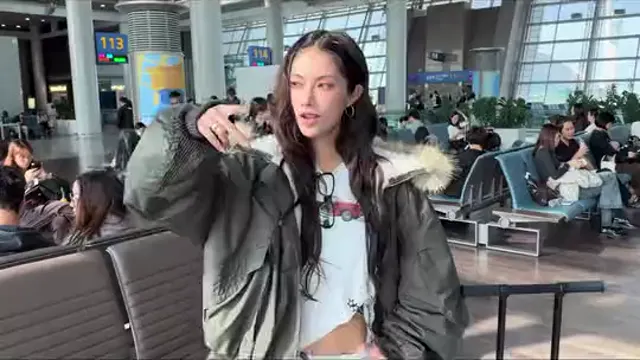
Airport transition with AI: an OK sign at the gate, a night street after
The airport transition is a two-shot reel: you sit at the airport gate, point at the camera, make a finger circle over the lens, and the camera pushes through it onto a neon city street at night, where you walk out and spin as the beat drops. One photo, two for a couple, or one of your pet, become an 8-second wide 16:9 version with the song, from 4 credits.
A close, clear face: the first four seconds are a close-up at the gate.
Video settings
First time here? See 2 seconds of your own video free, one per account. The full 8-second video is 4 credits. View pricing
Updated
Your video
Your video shows here when it is ready, and stays in My creations.
- At the gate
- Finger ring
- Night street
- The spin
The video
What the teleport transition looks like
A young woman in a puffer jacket sits in a bright departure lounge, chatting to her phone. She points at the lens, brings her hand right up to it and makes an OK sign, and the camera pushes into the little ring between her fingers. On the other side of the ring it is night: her hand is still there, but behind it is a busy street full of shop lights and yellow road markings. The hand drops, she looks into the lens, walks into the road and spins as the beat drops.
The clip playing here is the original Instagram reel by @31.ioa, posted on 14 November 2026, shown with credit as the reel this effect follows. It was not made on VideoEffect, and no sample made here exists yet.
Second by second
Two shots, one ring
Read from the original reel, one frame per second; the cut through the ring comes at 4 seconds.
| Time | What is on screen |
|---|---|
| 0:00 to 0:01.5 | At a table in the departure lounge, leaning back and talking to the camera. |
| 0:01.5 to 0:02.7 | A finger points at the lens. |
| 0:02.7 to 0:04 | An OK sign right over the lens; the camera pushes into the ring. |
| 0:04 to 0:05 | Cut: the ring now frames a night street; the hand drops, a close look into the lens. |
| 0:05 to 0:06.5 | A walk away into the middle of the road. |
| 0:06.5 to 0:08 | A turn back and a spin as the beat drops. |
How it works
How to make the airport transition video
- Choose a version: you, a couple, or your pet.
- Upload the photo or photos and pick a resolution. A clear face, close up, works best: the first four seconds are a close shot. The clip is always 8 seconds in wide 16:9.
- Press Create and download. The price is on the button; the MP4 comes with the song on it and no watermark.
Posting it. The original caption was about teleporting to Hong Kong, and that framing works: "teleporting to Hong Kong", "boarding, then this", or "no layover". Having the sound on the clip does not give you rights to use it everywhere, so check a platform's rules before you put the video in an ad or a paid post, and switch on the AI-generated label when you post.
Versions
Alone, as a couple, or your pet travelling
You takes one photo. You sit at the gate, make the ring and land on the night street, in the clothes of your photo in both shots.
Couple takes two photos. Photo 1 sits on the left and makes the ring; photo 2 sits beside you, and you walk into the street and spin together.
Your pet takes one photo of an animal. It sits at the gate and lifts a paw, a hand from behind the camera makes the ring, and on the street it trots off and spins.
All three follow the same reel, run 8 seconds and cost the same.
Price
Eight seconds and what they cost
The video is 8 seconds, 16:9, with sound. The table below lists the credits for each resolution, from 4. The smallest pack is 10 credits for $9.99. Pack credits never expire and a failed render returns its credits. An account that has never bought credits can first make one free 2-second preview at 480p, to watch on the page.
The original reel is a wide 16:9 picture inside a vertical frame, with black bars above and below. The effect makes that wide picture itself, edge to edge, with no black bars.
| Length | 480p | 720p | 1080p |
|---|---|---|---|
| 8 seconds | 4credits | 6credits | 12credits |
The trend
Where the airport transition comes from, and the song
Travel creators have filmed airport transitions for years, one shot at the airport, one hidden cut, and already at the destination, under tags like #airporttransition. The finger circle version took off in November 2026: on 14 November @31.ioa posted her teleport to a Hong Kong street at night, the reel this page follows, and "teleporting to Hong Kong" became a search of its own.
The sound is the hook of "Walk It Talk It" by Migos. The trend is also called the teleport transition, the finger circle transition or simply a travel transition.
VideoEffect is not affiliated with Migos, the creator linked here, Instagram, TikTok or CapCut.
Photos
A photo for a close-up and a street
These points follow from the original reel; the effect has not been test-rendered.
- Face clear and close. The first four seconds are a close shot at the gate, and the face fills the ring at the cut.
- Upper body at least. On the street you are seen walking and spinning.
- One outfit for both shots. Your clothes come from the photo and stay the same at the airport and on the street.
- One person per photo.
- For pets, face and body. Your pet sits at the gate and trots on the street.
- Use your own photo, and the photo of a partner who agreed to be in it.
Good to know
What the teleport cannot change
- The destination is the night street of the original reel; you cannot choose another city.
- The airport lounge is the original's too.
- Two people at most.
- It is always 8 seconds and wide 16:9, with the song; there is no vertical 9:16 version.
Prompt
The three prompts behind the cut
Below are the prompts for you, a couple and your pet. Each describes the lounge and the night street, keeps the push through the finger ring at 4 seconds, says who makes the ring, and times the look, the walk and the spin. They are used together with the 8-second reference clip and its sound.
You
[Video 1] shows the airport finger-circle transition. Follow [Video 1] from the first frame to the last: copy its two shots, the push through the finger ring at the same moment, the framing of each shot and every gesture, look, walk and spin on the same beat. Shot 1 is the one in [Video 1]: a bright airport departure lounge by day, big windows, rows of seats and travellers behind, the camera close at table height. Shot 2 is the one in [Video 1]: a busy city street at night with glowing shop lights, tall buildings, yellow road markings, metal railings and dark cars. Do not add any action or scene element that is not in [Video 1].

Use [Audio 1] as the sound of the whole video, unchanged: no new music, voices or speech. Nobody speaks.

The person in [Image 1] fully replaces the young woman in [Video 1] in both shots. The subject is in her place in every frame, as large in the picture, with the same direction of body and head. Face, hair, build and clothes all come from [Image 1] and stay the same in both shots, at the airport and on the street; nothing of the woman is kept. Her long dark hair, green puffer jacket, dark jacket, shorts and boots are hers only: do not draw them on the subject. Ignore the background of [Image 1] and any text in it.

What happens, as in [Video 1]: 0 to 1.5 s, at a table in the lounge, the subject leans back and talks to the camera; 1.5 to 2.7 s, points one finger at the lens; 2.7 to 4 s, brings the hand right up to the lens and makes a ring with the thumb and index finger, and the camera pushes into the ring; at 4 s, the hard cut through the ring: the same hand still makes the ring in front of the lens, now at night on the street; 4 to 5 s, the hand opens and drops, and the subject looks straight into the lens from close up; 5 to 6.5 s, turns and walks away into the middle of the road; 6.5 to 8 s, turns back to the camera and spins on the spot as the beat drops.

16:9 horizontal, the wide frame of [Video 1]: both shots fill it edge to edge, with no black bars. No split screen, no captions, text, watermarks or stickers on the picture. The face stays the same as in [Image 1] in both shots.
Couple
[Video 1] shows the airport finger-circle transition. Follow [Video 1] from the first frame to the last: copy its two shots, the push through the finger ring at the same moment, the framing of each shot and every gesture, look, walk and spin on the same beat. Shot 1 is the one in [Video 1]: a bright airport departure lounge by day, big windows, rows of seats and travellers behind, the camera close at table height. Shot 2 is the one in [Video 1]: a busy city street at night with glowing shop lights, tall buildings, yellow road markings, metal railings and dark cars. Do not add any action or scene element that is not in [Video 1].

Use [Audio 1] as the sound of the whole video, unchanged: no new music, voices or speech. Nobody speaks.

From start to finish there are two people. The person in [Image 1] replaces the young woman in [Video 1] and sits on the left; the person in [Image 2] sits beside them on the right in the lounge and stands beside them on the street. Each subject's face, hair, build and clothes come only from their own photo and stay the same in both shots; the two faces are never mixed or swapped. The young woman's long dark hair, green puffer jacket, dark jacket, shorts and boots are not drawn on either subject. Ignore the backgrounds of both photos and any text in them.

What happens, as in [Video 1]: 0 to 1.5 s, the two sit side by side at a table in the lounge and lean in toward the camera; 1.5 to 2.7 s, the subject of [Image 1] points at the lens; 2.7 to 4 s, the same subject makes a ring with the thumb and index finger right in front of the lens, and the camera pushes into the ring; at 4 s, the hard cut through the ring: the same hand still makes the ring in front of the lens, now at night on the street; 4 to 5 s, the hand opens and drops, and the two look straight into the lens from close up, side by side; 5 to 6.5 s, they turn and walk away together into the middle of the road; 6.5 to 8 s, they turn back to the camera and spin as the beat drops.

16:9 horizontal, the wide frame of [Video 1]: both shots fill it edge to edge, with no black bars. No split screen, no captions, text, watermarks or stickers on the picture. Exactly two people in focus. Both faces stay the same as in their own photos in both shots.
Your pet
[Video 1] shows the airport finger-circle transition. Follow [Video 1] from the first frame to the last: copy its two shots, the push through the finger ring at the same moment, the framing of each shot and every gesture, look, walk and spin on the same beat. Shot 1 is the one in [Video 1]: a bright airport departure lounge by day, big windows, rows of seats and travellers behind, the camera close at table height. Shot 2 is the one in [Video 1]: a busy city street at night with glowing shop lights, tall buildings, yellow road markings, metal railings and dark cars. Do not add any action or scene element that is not in [Video 1].

Use [Audio 1] as the sound of the whole video, unchanged: no new music, voices or speech. Nobody speaks.

The animal in [Image 1] takes the young woman's place in both shots. Its species, breed, face, eyes, ears, fur colors, fur length and markings come only from [Image 1] and stay the same in both shots; it wears no clothes, and nothing of the woman is kept. It has animal paws, never human hands. The ring is made by a person's hand reaching in from behind the camera; only that hand is seen. Ignore the background of [Image 1] and any text in it.

What happens, as in [Video 1]: 0 to 2.7 s, the animal sits on a seat at a table in the lounge, close to the camera, tilts its head and lifts one paw toward the lens; 2.7 to 4 s, a hand from behind the camera makes a ring with the thumb and index finger right in front of the lens, framing the animal, and the camera pushes into the ring; at 4 s, the hard cut through the ring: the same hand still makes the ring in front of the lens, now at night on the street; 4 to 5 s, the hand opens and drops, and the animal looks straight into the lens from close up; 5 to 6.5 s, it turns and trots away into the middle of the road; 6.5 to 8 s, it turns back to the camera and spins around once as the beat drops.

16:9 horizontal, the wide frame of [Video 1]: both shots fill it edge to edge, with no black bars. No split screen, no captions, text, watermarks or stickers on the picture. The animal looks the same as in [Image 1] in both shots.
What is the airport transition trend?
A travel reel trick: one shot at the airport, a hidden cut, and you are at the destination. The November 2026 version uses a finger circle over the lens that the camera pushes through onto a night street.
How do I make the airport transition with AI?
Choose You, upload one close, clear photo, pick a resolution and press Create. You download an 8-second wide 16:9 MP4 with the song.
Is it free?
Only a 2-second preview is. An account that has never bought credits gets one free 2-second preview at 480p, to watch on the page; the full video costs credits, from 4. Credits return if the render fails.
What is the "teleporting to Hong Kong" trend?
The same trick: it is the caption of the reel by @31.ioa, which ends on a Hong Kong street at night.
What song is it?
The hook of "Walk It Talk It" by Migos. The video carries the sound of the original reel.
Can I do it with my partner?
Yes. The Couple version puts both of you at the gate and on the street; photo 1 makes the ring.
Can my dog or cat teleport?
Yes. The Your pet version puts your animal at the gate and on the street. It has not been test-rendered yet.
Do I need to be at an airport?
No. Both places come from the original reel; you only need a photo.
How long is the video, and what format?
Eight seconds, wide 16:9, as an MP4 with the song on it and no watermark.
Is the example on this page made with VideoEffect?
No. It is the original reel by @31.ioa, shown with credit. This effect has not been test-rendered yet.
More effects
More transition effects
If one teleport was not enough, these effects have other cuts and reveals.
Airport Transition
Make yours
The price is on the Create button before anything is charged, and a render that fails gives its credits back.